
Last updated: October 2026 | By Laman7 Editorial Team
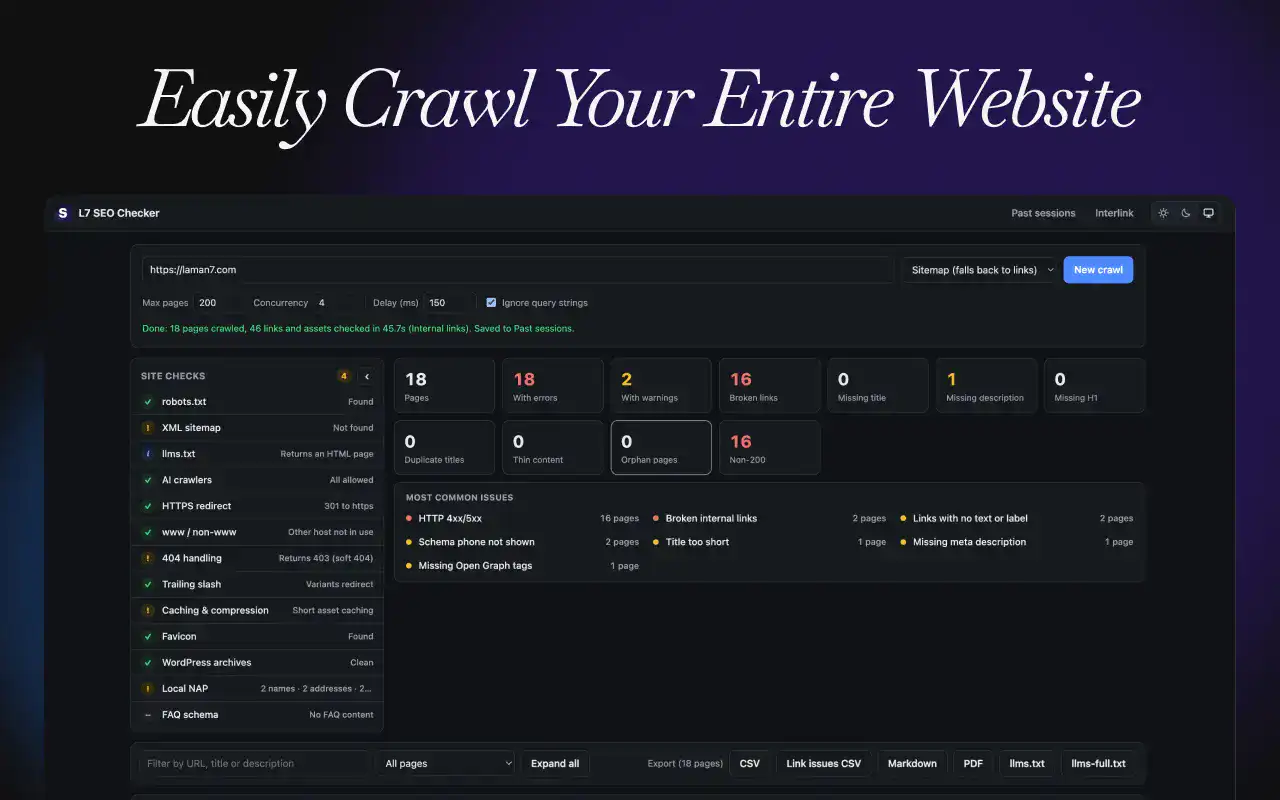
Laman7 is a B2B web design and SEO agency based in Shah Alam, Malaysia, and we audit a lot of websites before we redesign or optimise them. L7 SEO Checker is the tool we built for that work, and we have made it a free SEO checker Chrome extension that anyone can use. It crawls your website from your browser and turns it into a clear, prioritised SEO audit.
Quick answer: L7 SEO Checker is a free Chrome extension that crawls a website and audits its on-page SEO, internal links, sitemap, robots.txt, structured data and AI crawler access. It needs no account, collects no data, and saves every audit only in your own browser.
This article covers what the extension checks, who it is for, how to run your first audit, and how it handles your data. The full privacy policy is at the bottom of this page.
Why We Built a Free SEO Checker Chrome Extension
Most website audits start the same way: crawl every page, find what is broken, and decide what to fix first. Desktop crawlers do this well, but they need installing, licences for larger sites, and some setup before the first result.
We wanted something lighter for everyday checks:
- Quick audits before a pitch or a website revamp, without opening a separate application
- Spot checks after a fix, to confirm a page is now correct
- A tool clients can run themselves, with results that are easy to read and share
L7 SEO Checker is a lightweight, browser-based alternative to desktop crawlers like Screaming Frog and Sitebulb. It does not replace them for every job, but for most small and mid-sized business websites in Malaysia, it covers the checks that matter most.
What L7 SEO Checker Audits
On-page SEO, page by page
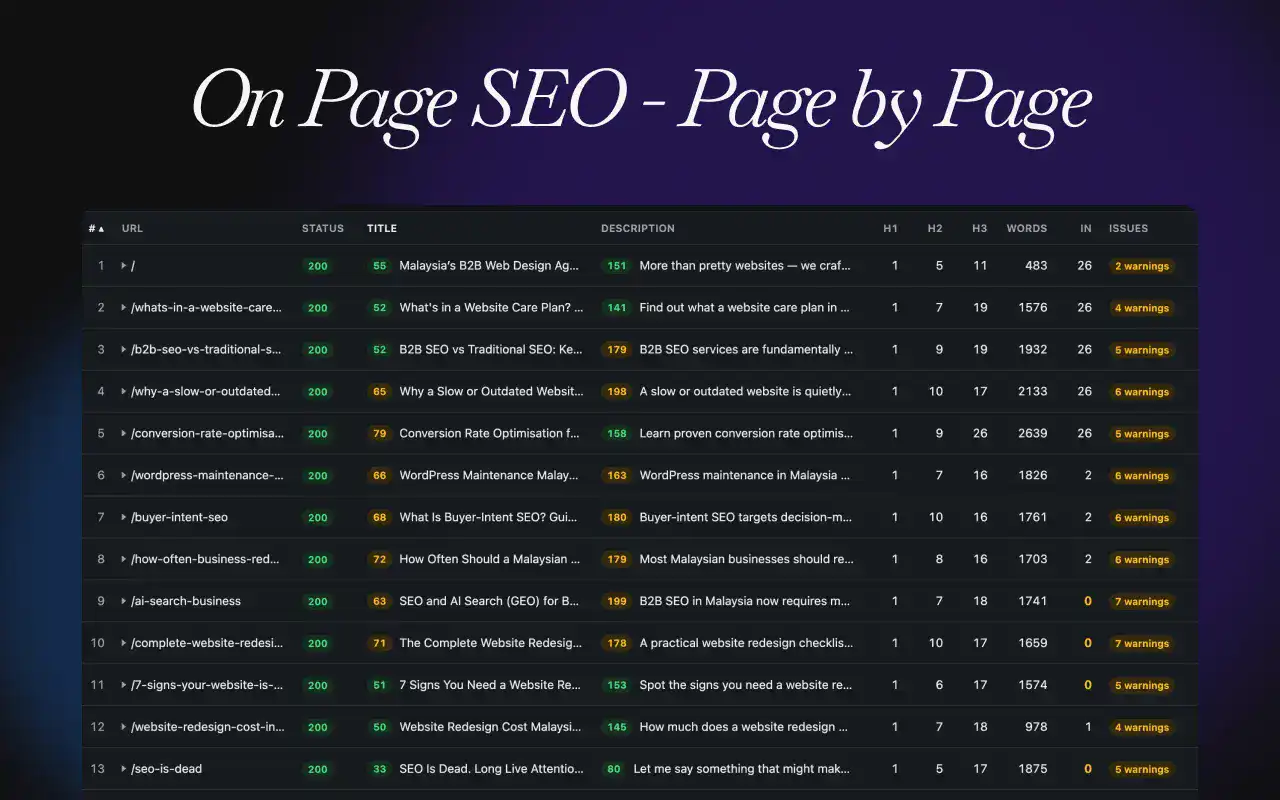
Every page in the crawl gets its own row in the report, with the full detail one click away:
- Titles and meta descriptions: missing, too long, too short or duplicated
- Headings: missing or multiple H1s, duplicate H1s across pages, skipped heading levels, and the full heading outline
- Content: main-content word count (excluding the header, menu and footer), so thin and near-empty pages stand out
- Indexing signals: canonical tags, meta robots, X-Robots-Tag, noindex and nofollow
- Images: missing alt text, missing width and height, oversized files and lazy-loading
- Social tags: Open Graph and Twitter Card tags, including broken OG images
- Structured data: invalid JSON-LD and missing required fields for Article, Product, LocalBusiness, FAQPage, BreadcrumbList and more
- Hreflang: invalid language codes, missing return links and missing self-reference
Internal links and site structure
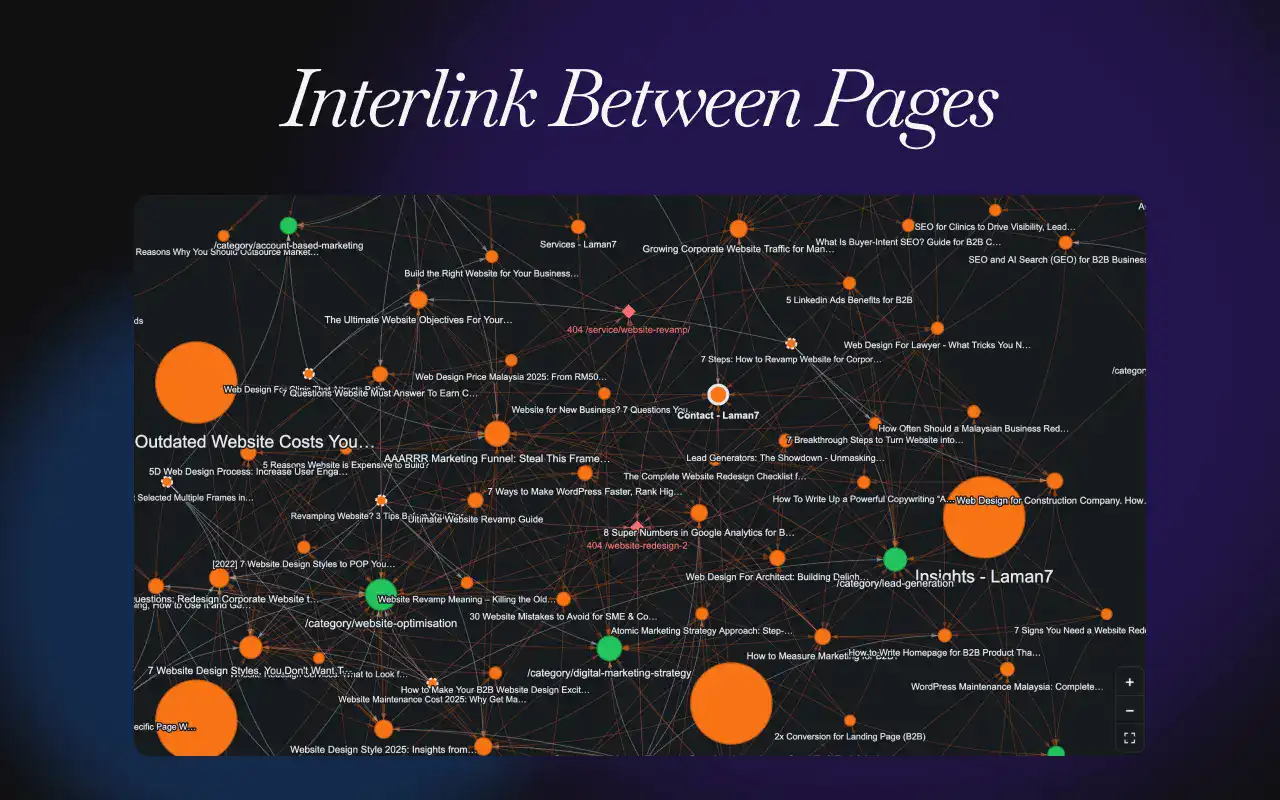
Internal linking is where many business websites quietly lose rankings. The extension checks:
- Broken internal links, and the exact page each one sits on
- Links that point to redirects, redirect chains and temporary redirects
- Orphan pages that no other page links to, and click depth from the homepage
- Anchor text: empty links, image links without alt text, and generic anchors such as “click here”, “read more” or “baca lagi”
The Interlink map shows how your pages connect as an interactive graph. Pages are labelled by title and coloured by section, the most-linked pages appear larger, and menu and footer links are hidden so your in-content linking is easy to judge.
Site-wide technical checks
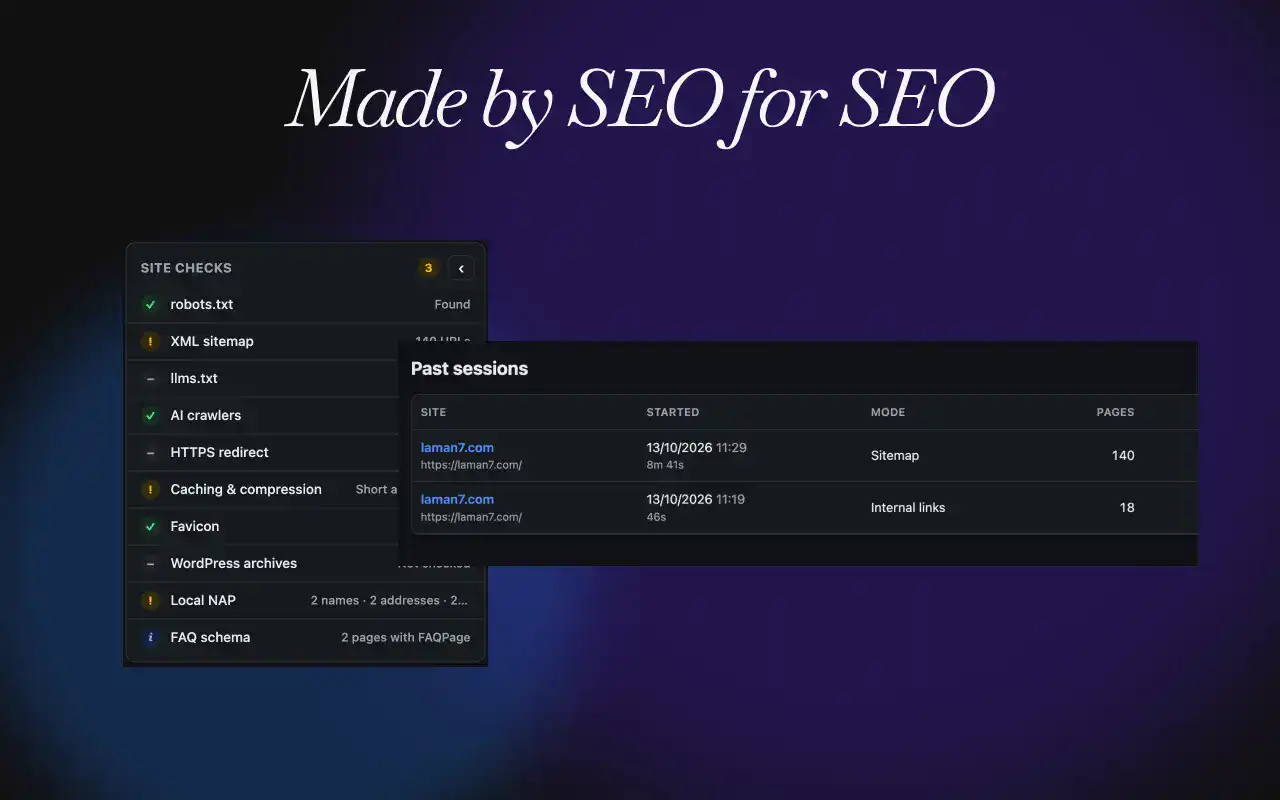
A side panel summarises the checks that apply to the whole website:
| Check | What it tells you |
|---|---|
| robots.txt and XML sitemap | Whether they exist, and which sitemap URLs redirect, error, are noindex or are blocked |
| HTTPS and www | Whether http:// and the other www version redirect to your main address |
| 404 handling | Whether missing pages return a proper 404 or a “soft 404” |
| Trailing slash | Whether /page and /page/ both load as duplicates |
| Caching and compression | Gzip or Brotli, Cache-Control, browser caching for images, CSS and JS, and CDN detection |
| WordPress archives | Indexable tag, author, attachment, category and search pages |
| Local NAP | Business name, address and phone number across your pages and schema |
Ready for AI search
AI assistants such as ChatGPT, Claude and Perplexity are now part of how buyers research suppliers. L7 SEO Checker helps you prepare:
- AI crawler check: whether your robots.txt allows or blocks 14 AI crawlers, with AI search bots shown separately from model-training bots
- llms.txt check: whether your site has one, and whether it has a title, summary and links
- llms.txt and llms-full.txt generator: create both files from your crawl, in clean Markdown
- Copy as Markdown: copy any page’s main content in one click
How to Run Your First SEO Audit
- Add the extension: install L7 SEO Checker from the Chrome Web Store.
- Open your website in Chrome and click the L7 SEO Checker icon in the toolbar. Your address is filled in automatically.
- Choose a crawl mode: Sitemap (recommended), follow internal links, or a single URL.
- Click Start crawl and allow Chrome to read that website when prompted. Permission is asked once per site.
- Review the results: start with the Site checks panel and the “Most common issues” list, then filter the table to the pages that need attention.
- Fix and recheck: after a fix, click the recheck icon on that row to audit just that page again.
Every crawl is saved under Past sessions, so you can reopen it later, resume a stopped crawl, or compare it with a newer crawl to see new and fixed issues. Results export to CSV, Markdown or PDF, and exports follow your current filter, so you can send a client only the pages with errors.
Free to Use, With No Data Collected
L7 SEO Checker is free to use. There is no account, no sign-up and no subscription.
No data is collected. The extension has no analytics, no tracking and no server of its own. When you run an audit:
- Pages are requested directly from your browser to the website you entered, as a logged-out visitor
- Results are saved only in your browser’s local extension storage
- Nothing is sent to Laman7 or to any third party
- Chrome asks for permission to read each website the first time you crawl it, one site at a time
This matters for agencies and in-house teams auditing client or pre-launch websites: the audit stays on your computer unless you choose to export and share it.
What L7 SEO Checker Does Not Do
Being clear about limits helps you choose the right tool:
- No JavaScript rendering. The extension reads the HTML your server sends. Content added by JavaScript after the page loads is not seen. WordPress, Bricks, Elementor and most CMS websites work well.
- Same-site checks only. It checks links and assets on your own domain, not external websites.
- Not a rank tracker. It audits your website itself; it does not track keyword positions or backlinks.
If an audit shows deeper problems, such as a structure that needs rebuilding or content that needs a rethink, that is usually the point where a website redesign or a focused B2B SEO plan pays off.
Frequently Asked Questions
Is L7 SEO Checker free?
Yes. L7 SEO Checker is free to use, with no account, sign-up, subscription or page limit beyond the 5,000 pages per crawl setting. It is built and maintained by Laman7, a B2B web design and SEO agency in Shah Alam, Malaysia.
Does L7 SEO Checker collect my data?
No. The extension has no analytics or tracking and sends nothing to Laman7. Crawl results are stored only in your browser’s local extension storage and stay on your computer unless you export them yourself.
Is L7 SEO Checker an alternative to Screaming Frog or Sitebulb?
L7 SEO Checker is a lightweight, browser-based alternative for quick and routine audits. Desktop crawlers offer more advanced features such as JavaScript rendering. For most small and mid-sized business websites, the extension covers the essential checks.
Does it work on WordPress websites?
Yes. L7 SEO Checker works well on WordPress, including Bricks and Elementor builds. It also includes WordPress-specific checks, such as indexable tag, author, attachment and search pages that usually should be set to noindex.
Can it check if AI crawlers can access my website?
Yes. The AI crawler check reads your robots.txt and shows whether 14 AI crawlers, including OpenAI, Anthropic, Perplexity and Google-Extended, are allowed or blocked. AI search bots are shown separately from model-training bots.
Start Auditing Your Website Today
L7 SEO Checker gives you a clear, prioritised view of your website’s SEO in minutes, for free, without your data leaving your computer. Install it, run your first audit, and fix the issues that matter most.
If the audit shows your website needs more than quick fixes, book a consultation with Laman7. We help Malaysian B2B companies revamp, optimise and maintain websites that bring in qualified leads.
Screaming Frog and Sitebulb are trademarks of their respective owners. L7 SEO Checker is not affiliated with or endorsed by them.
L7 SEO Checker Privacy Policy
Effective: October 2026
L7 SEO Checker is a Chrome extension made by Laman7 (“we”). This policy explains how the extension handles information.
Information we collect
We do not collect any personal information or usage data. The extension has no analytics, no tracking, no advertising and no user accounts, and it does not send any information to Laman7 or to any third party.
How the extension works
When you start an audit, the extension requests pages, robots.txt, sitemaps, llms.txt and images directly from the website you entered. These requests go from your browser to that website only, as a logged-out visitor, without your cookies.
Data stored on your device
Audit results, such as page addresses, titles, headings and issues found, are saved in your browser’s local extension storage so you can reopen, resume and compare audits. This data stays on your device. It is never uploaded by the extension. Your theme preference (light, dark or system) is also stored locally.
Permissions
- Website access: Chrome asks for your permission to read each website the first time you audit it. You can remove this access at any time from chrome://extensions.
- activeTab: when you click the extension icon, it reads the current tab’s address to pre-fill the website to audit.
- storage and unlimitedStorage: used to save your audits on your device.
- webRequest: used only to observe redirects on the extension’s own requests to the website being audited, so it can report redirect chains. It does not observe your browsing.
Exports and sharing
Files you export (CSV, Markdown, PDF, llms.txt) are created on your device. What you do with them is up to you.
Deleting your data
Delete individual audits from the Past sessions page, or remove the extension to delete all stored data.
Children’s privacy
The extension is a professional SEO tool and is not directed at children. It collects no information from anyone.
Changes to this policy
If this policy changes, we will update this page and the effective date above.
Contact
Questions about this policy can be sent through laman7.com/book.